
Turn one video into your entire short-form feed.
Klypse analyzes your long-form video, automatically detects the strongest moments and creates on-brand clips for TikTok, Instagram Reels & YouTube Shorts – including cuts, captions and social copy. Minutes instead of hours in the editing timeline.

Advanced face tracking & reframing
Klypse locks onto every subject and reframes landscape to vertical — your speaker stays perfectly in frame, automatically.
From raw video to posted clip
Highlight detection, auto-reframing, hook scoring, a built-in editor and one-click sharing — all in one place.
Built for people who need consistent content from every video.
Whether you publish as a personal brand, turn client calls into content or run multiple channels – Klypse makes sure each long-form video becomes multiple ready-to-post clips.
Creators & personal brands
Turn talking-head videos, vlogs or live sessions into a steady stream of Reels, Shorts & TikToks without a full-time editor.
Coaches, consultants & experts
Repurpose calls, webinars and keynotes into short clips that show your expertise on LinkedIn, Instagram and YouTube.
Agencies & social teams
Manage multiple brands with one workflow. Klypse handles analysis, cutting, captions & copy so your team focuses on strategy.
Real Klypse output: a short-form ad generated from a long-form video.
Built different from other clip generators.
Most tools just cut your video. Klypse understands it.
Word-Perfect Cuts
Never cuts mid-word. Every clip starts and ends on natural speech boundaries.
Face Tracking
Smart cropping follows faces when converting landscape to vertical. Speakers stay centered.
Hook Scoring
Each clip is scored for hook strength. Best clips surface first with platform-specific ratings.
Full Transparency
See exactly what AI optimized. No black box – every trim and adjustment is explained.
From long-form to finished clips – in three steps.
No complex workflow. A simple interface and clear process – you always see what's happening to your video.
- 1
Upload your video & pick a format
Upload a file, choose your target format (e.g. 9:16) and see exactly how many credits the processing will use.
- 2
Let Klypse analyze and cut
Transcription, highlight detection, face tracking and segmentation run in the background. Choose Shorts, Fast Cut, Jump Cut or Search mode depending on your goal.
- 3
Review, fine-tune & export
Review clips ranked by hook strength, check transcripts and social copy in the dashboard. Download what you like and send it straight to your scheduler.
Product flow
Real-world effectSee how one video moves through Klypse – from upload to branded clips in your editor.
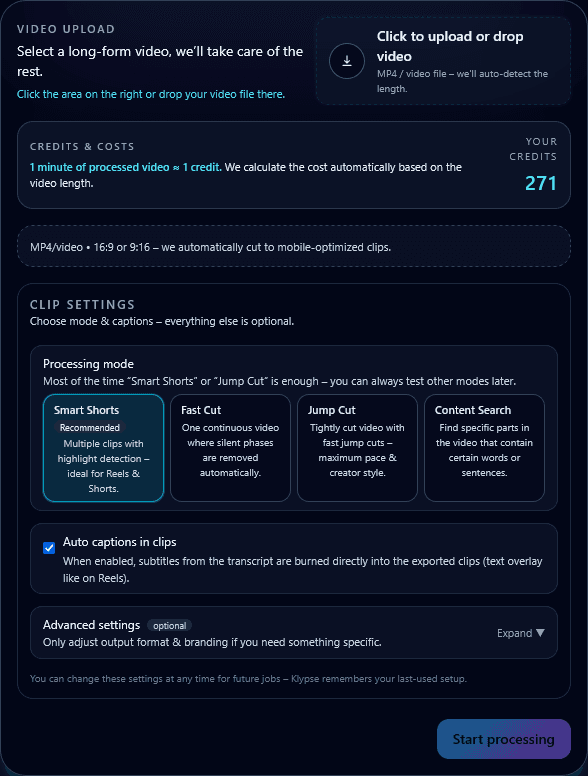
Step 1 · Upload
Drop your long-form video
Drag & drop a file or paste a YouTube link and select your target format.
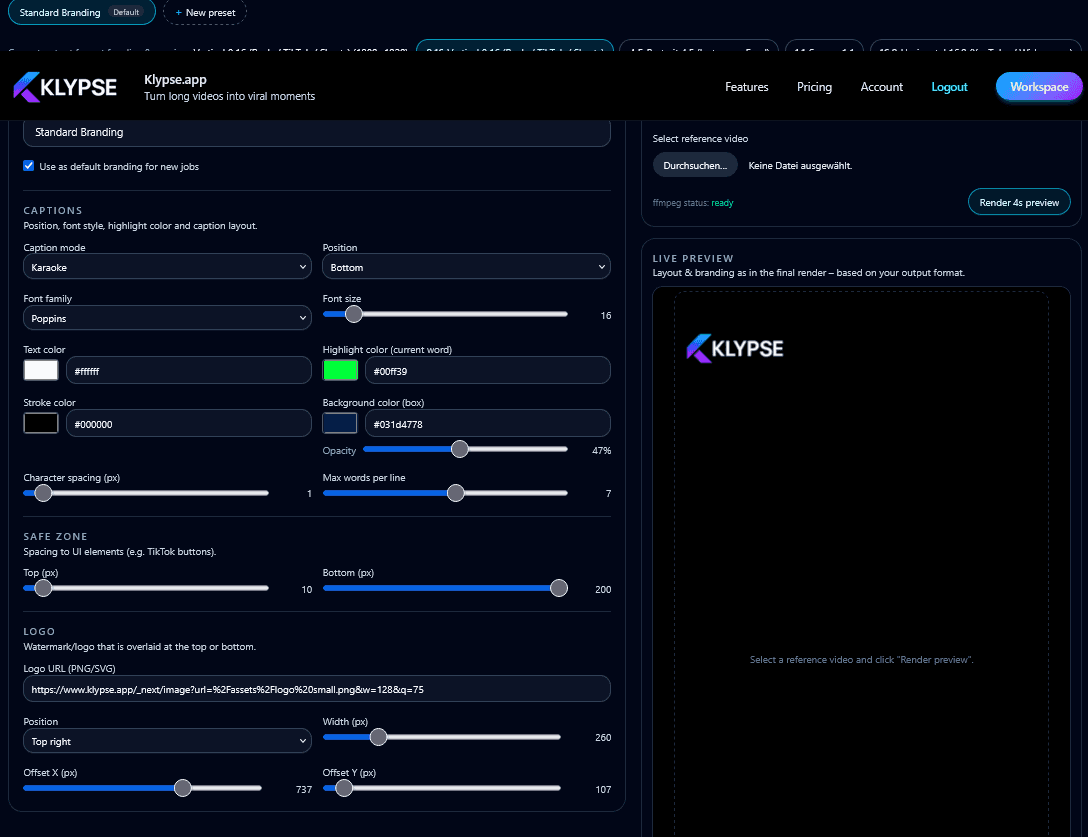
Step 2 · Branding
Set fonts, colors & safe zones
Define once how your captions, logo and overlays should look across all clips.
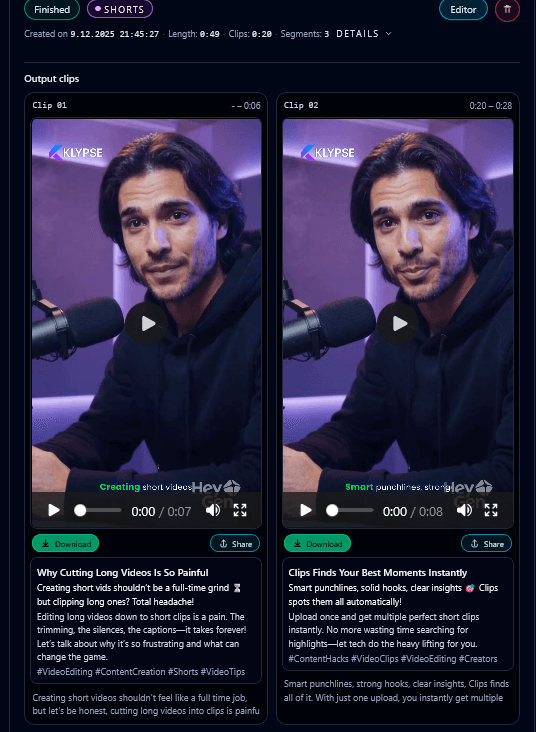
Step 3 · Clips
Klypse generates multiple clips
See clip length, hook score, transcript and credit usage at a glance.
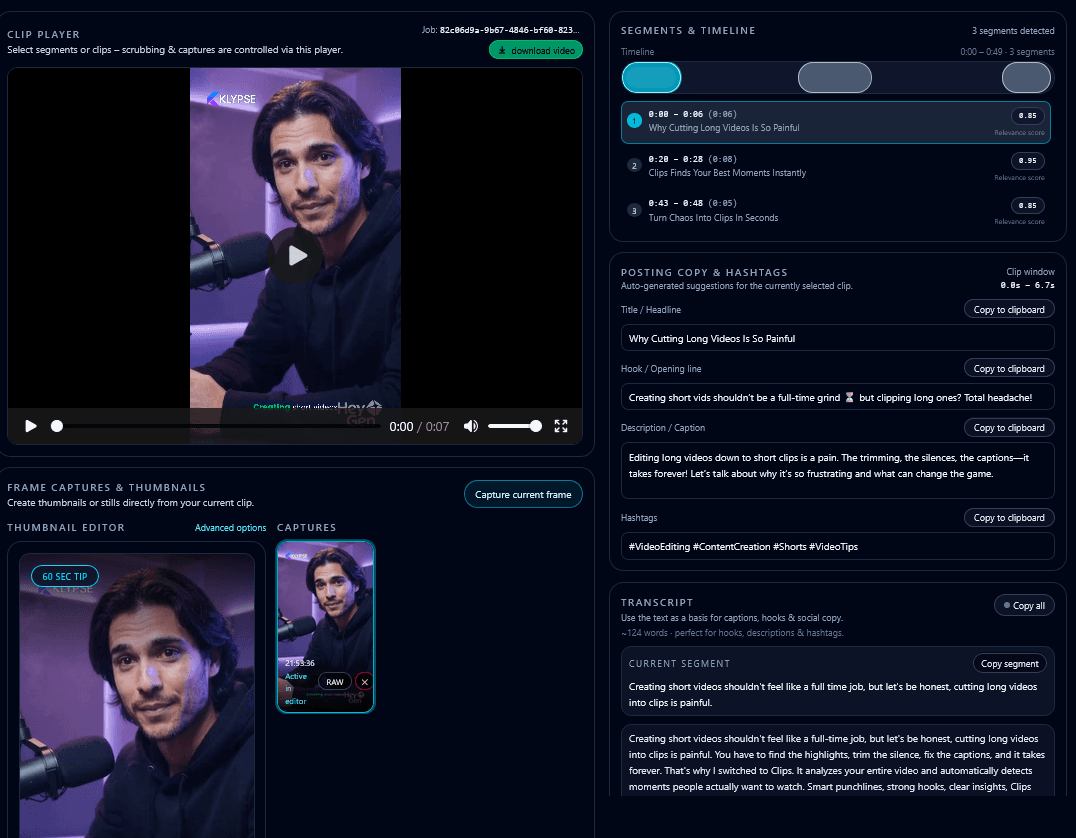
Step 4 · Editor
Review & export instantly
Light tweaks in the editor, then export ready-to-post files.
One 40-minute video typically turns into multiple publish-ready, on-brand clips – all within a single workflow.
Four processing modes – depending on how you want to use your clips.
Klypse doesn't just cut "something". You control whether you want high-energy reels, clean explainers or clips for specific topics.
Shorts
Standard highlight reels
Klypse picks the strongest moments and builds multiple vertical clips with captions – ideal for TikTok & Reels.
Fast Cut
Dynamic, fast cuts
Focus on pace and energy: tight cuts, few pauses – perfect for attention-grabbing social ads & viral clips.
Jump Cut
Clean talking-head cutting
Pauses & filler words are removed – ideal for educational content, explainers and talking-head reels.
Search
Search-based clip creation
Find segments by topic, keyword or hook and generate matching clips – like a content search engine inside your video.
Why Klypse saves time, stress and budget in real workflows.
Instead of manual editing chaos you get a repeatable process – from recording to finished short-form clips ready to post.
Up to 90% less editing time
No more manual scrubbing, cutting and captioning. One upload – multiple clips that just need your approval.
Automatically finds the strongest moments
AI detects hooks, 'aha' moments and clear one-liners so you don't have to hunt for them in the timeline.
Always on-brand & ready to post
Fonts, colors, logo placement and safe zones are defined once. Captions and social copy are generated for every clip.
Smart cropping that follows faces
When converting landscape to vertical, Klypse detects faces and crops intelligently – no more speakers cut off at the edge.
Clips ranked by viral potential
AI scores each clip's opening hook and ranks them by quality. Best clips surface first, with TikTok, Reels and Shorts scores.
See exactly what AI optimized
Full transparency on every adjustment. See what was trimmed, why hooks were scored, and how clips were optimized – no black box.
Loved by creators
Rated 4.6 out of 5 by 90,000+ creators who let Klypse cut their clips.
Scroll-stopping thumbnails, designed by AI
Every clip comes with click-worthy cover thumbnails — bold text, expressive faces and high-contrast framing tuned to win the tap.


Flexible credits & plans – matching your content volume.
Start with a free trial (2 full-feature videos · 7-day access), then choose credit packs or subscriptions. You only pay for minutes you actually process.
Prefer to pay once?
One-time credit packs
No subscription. Credits never expire. 1 credit = 1 minute of video.
Turn one video into content for weeks.
Start your free trial (2 full-feature videos · 7-day access) and upload your first long-form video. Klypse handles analysis, clips, captions and social copy – you publish.