
Turn Long Videos into Viral Short Clips
Podcasts, webinars, interviews, course recordings — Klypse finds the moments worth posting, reframes them to vertical and captions every word. You review, download and post.
From landscape rambles to vertical hooks
Every clip below was cut, reframed and captioned automatically from a long-form source.
Long video in, short videos out — 3 steps
Upload or paste a link
Drop in an MP4, MOV or WebM up to 3GB — or paste a YouTube URL and we'll fetch it. Transcription starts immediately.
AI picks the moments
Every segment is scored for hook strength, speech energy and visual quality. GPT ranking keeps only moments that work without context.
Review, tweak, download
Each clip arrives reframed to 9:16 with word-timed captions and a hook score. Trim or restyle in the editor, then download.
The AI reads the whole video — so you don't scrub through it
Klypse maps speech, energy and topic shifts across the full timeline, then surfaces the segments most likely to stop a scroll. A one-hour recording becomes a shortlist of 5–15 candidate clips in minutes.

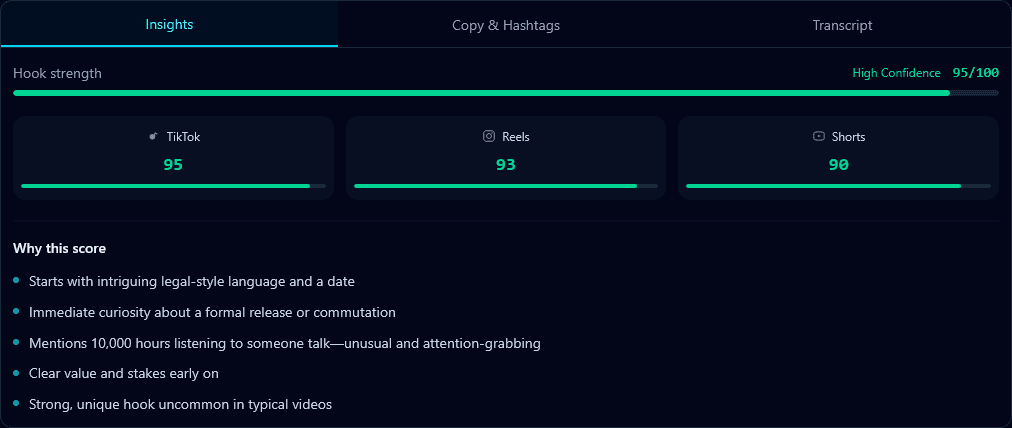
Know which short to post first
Every clip gets a hook score from 0–100 rating how well its first seconds hold attention — clarity, curiosity, no slow lead-in. Post the strongest clip first instead of guessing, and see at a glance why a moment was chosen.
Titles, descriptions and hashtags are drafted for each clip too, in the same language as your video.
AI highlight detection
Transcript, audio energy and visual signals combined — not just loudness spikes. Clips start and end on natural sentences.
Face-tracked reframing
Landscape to vertical without losing the speaker. Multi-speaker sources get split-screen; screen shares stay readable.
Word-perfect captions
Word-level timing with animated styles you can customize. Captions are positioned to avoid covering faces or on-screen text.
Hook scores on every clip
A 0–100 score for the first seconds of each clip, so you always know your strongest post.
Built-in clip editor
Trim boundaries, edit caption text and timing, switch caption templates — no external editor needed.
Every format
9:16 for TikTok, Reels and Shorts, plus 1:1 and 16:9. Paid exports in clean 1080p.
Manual editing vs. Klypse
Cutting shorts by hand
- • Re-watch the full recording to find moments
- • Crop and keyframe the reframe manually per clip
- • Type or correct captions line by line
- • 1–2 hours per finished short
With Klypse
- • AI shortlists the strongest moments for you
- • Faces tracked and framed automatically
- • Word-timed captions generated and styled
- • A batch of clips from one upload, in minutes
Long Video to Short Video — FAQ
How do I convert a long video to short videos?
Upload your video (or paste a YouTube link), pick your output format — 9:16 for TikTok, Reels and Shorts — and Klypse's AI finds the strongest moments automatically. You get multiple short clips with captions, each scored for hook strength, ready to preview and download.
Is there a free way to try it?
Yes. Your free trial includes 2 full-feature videos with every AI feature enabled — no credit card required. Free downloads include a small Klypse watermark; upgrading removes it from all your clips retroactively.
How does the AI decide which moments become clips?
Klypse transcribes your video word-by-word, scores every candidate segment on hook strength, speech energy and visual quality, and uses GPT ranking to pick moments that stand alone without context. Each clip starts and ends on natural sentence boundaries — no mid-word cuts.
What happens to faces when a landscape video becomes vertical?
AI face tracking follows the active speaker and keeps them framed as the 16:9 source is reframed to 9:16. Multi-speaker podcasts get split-screen layouts, screen recordings keep the content readable, and b-roll is letterboxed instead of blindly cropped.
How long should my source video be?
Podcasts, interviews, webinars and course recordings from 10 minutes up to several hours all work. Longer sources give the AI more moments to choose from — a one-hour podcast typically yields 5-15 strong clips. On the free trial and free tier, the first 10 minutes of each video are processed.
Which platforms can I export for?
Vertical 9:16 for TikTok, Instagram Reels and YouTube Shorts, plus 1:1 and 16:9 formats. Paid exports are 1080p without a watermark; every clip comes with word-timed captions you can restyle or edit.
More Klypse tools
Your long videos are full of shorts
Free trial — 2 full-feature videos, no credit card required. Upload one and see what the AI finds.