
Klypse for YouTubers: Grow with Shorts
Every video you upload contains Shorts you never posted. Klypse's AI finds the strongest moments in your long-form content, crops them to vertical with face tracking, and adds captions — so your back catalog keeps working for your channel.
Your Back Catalog Is a Shorts Pipeline
Most YouTubers treat Shorts as a separate content lane — another thing to script, film, and edit on top of the weekly upload. But the raw material already exists. A 15-minute video is really a chain of short, self-contained moments: the sharp answer in an interview, the reveal in a tutorial, the story that lands, the take that sparks comments. Any of those can stand alone as a Short.
Shorts also reach a different audience than your uploads. They surface in their own feed, shown to viewers who have never clicked one of your thumbnails. That makes them a discovery channel for your long-form content: a viewer who watches a strong 45-second moment is one tap away from your channel page and the full video it came from.
The bottleneck has always been the editing. Scrubbing a long video for clip-worthy moments, reframing 16:9 footage to 9:16 without cutting yourself out of frame, and captioning every line takes longer than most creators can spend on secondary content. That is the part Klypse automates end to end.
Your 16:9 upload. A ready-to-post Short.
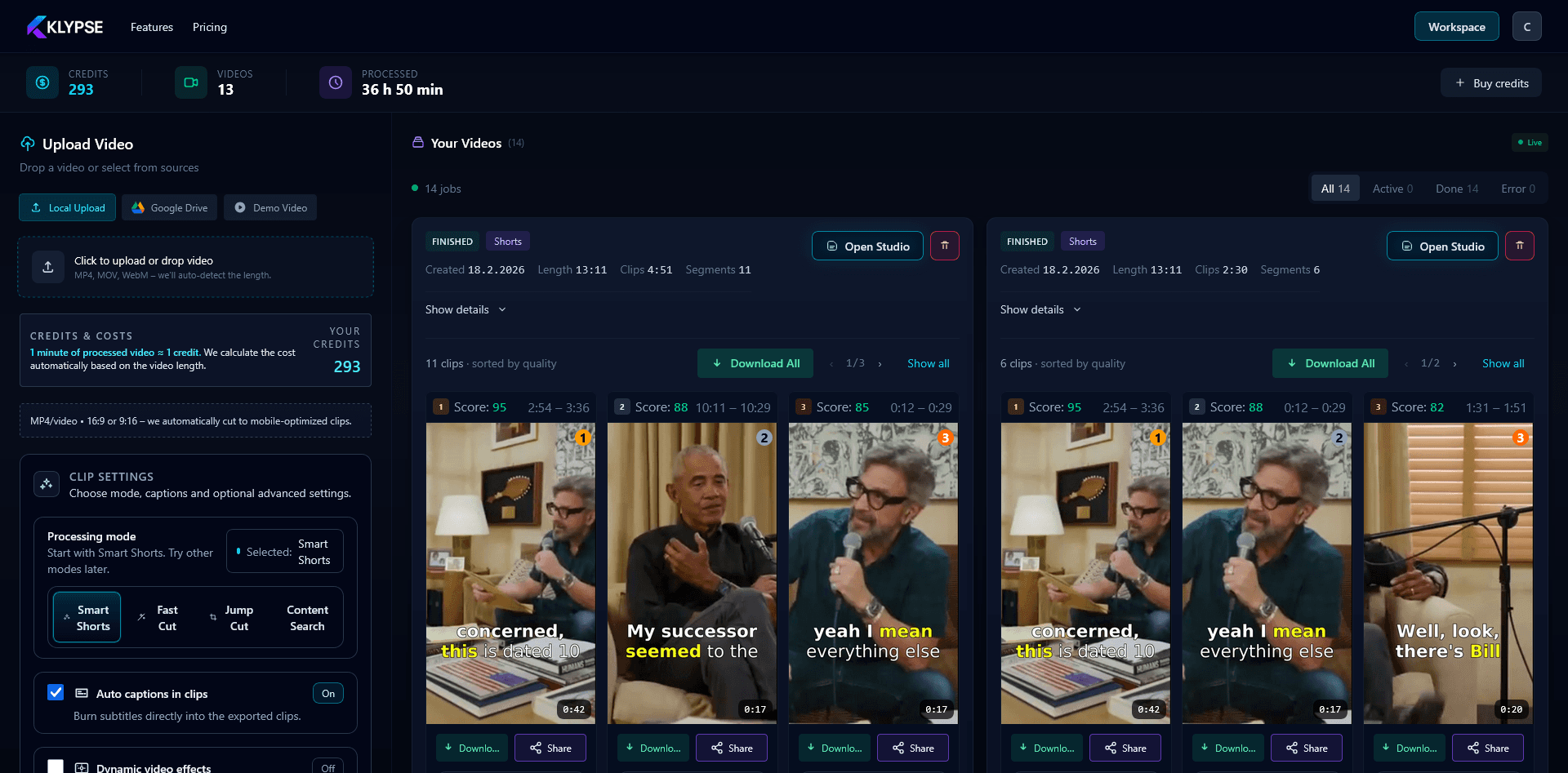
Actual Klypse results — landscape source reframed to vertical with face tracking and captions, no manual editing.
What Makes a Short Hook Work
Shorts live or die in the first two seconds. Viewers decide to stay or swipe before your intro finishes, which is why clips lifted straight from the start of a long video usually flop — long-form openings warm the viewer up, while a Short has to start mid-payoff.
The moments that hold attention share a pattern: they open on a claim, a question, or a tension that demands resolution ("here's the mistake everyone makes with…"), they are understandable with zero context from the rest of the video, and they resolve within the clip so the viewer gets a complete payoff. On-screen captions matter too — a large share of Shorts are watched with sound off or half-attention, so the words need to be readable on screen, synced to the voice.
Cold open
Start inside the interesting part — no setup, no "in this video". The first line is the hook.
Self-contained
The clip makes sense without the surrounding video and ends on a complete thought, not mid-sentence.
Readable captions
Word-synced captions keep sound-off viewers watching and reinforce the hook visually.
How Klypse Picks the Moments
Klypse transcribes your whole video with word-level timestamps, then analyzes the transcript and audio for the signals that make a moment clip-worthy: strong opening statements, quotable lines, complete story arcs, and shifts in energy. Candidate segments are cut at natural speech boundaries — a clip never starts or ends mid-sentence.
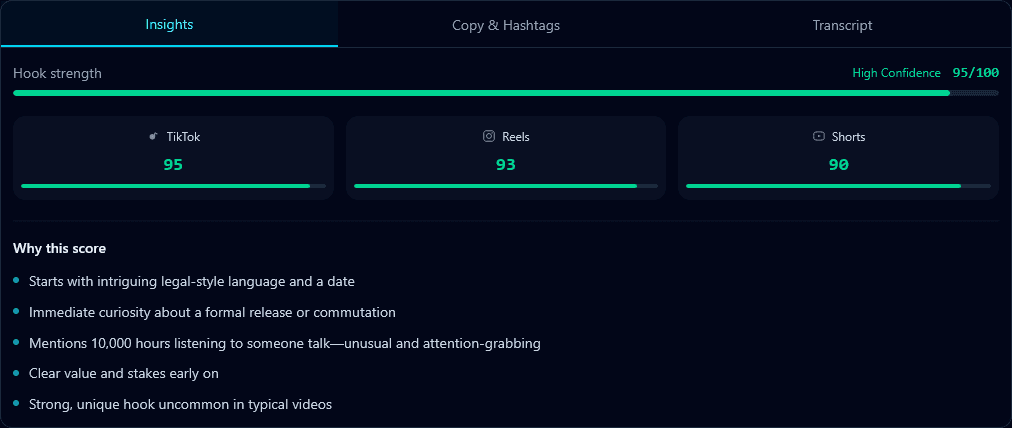
Every clip then gets a hook score: a rating of how likely its opening seconds are to stop a scrolling viewer. Instead of guessing which of your clips to post first, you sort by score and work down the list. Each clip also comes with AI-generated title and caption suggestions, so uploading is copy-paste instead of copywriting.
A Shorts Workflow That Fits a Weekly Upload
You don't need a second production schedule. One long-form upload per week can feed your Shorts shelf all week long:
- Upload day: publish your video, then paste the link or file into Klypse. The AI clips it while you handle comments and community posts.
- Review (10–15 min): open the workspace, skim the clips sorted by hook score, and trim anything you want tighter in the editor.
- Rest of the week: schedule your best clips as Shorts spaced between uploads. Each one points new viewers back at the full video and your channel.
How YouTubers Use Klypse
Add Your Video
Upload the file or paste your YouTube link into Klypse.
AI Creates Shorts
AI finds highlights, crops to vertical with face tracking, adds captions.
Post to Your Channel
Review clips ranked by hook score, download, and upload as Shorts.
Why YouTubers Choose Klypse
🎯Hook Score on Every Clip
Know which Short to post first instead of guessing.
♻️Repurpose Without Re-filming
Turn existing uploads into fresh Shorts content.
👤Face Tracking Reframe
You stay centered when 16:9 becomes 9:16 — no manual keyframes.
✂️Editor When You Want It
Trim, restyle captions, and adjust the crop before export.
YouTuber Features
YouTube URL Import
Paste video links directly
9:16 Vertical Crop
Shorts-ready framing with face tracking
Word-Level Captions
Captions synced to every word
Hook Scoring
Best clips surface first
Natural Clip Boundaries
No mid-sentence cuts
Titles & Descriptions
AI-generated copy per clip
YouTuber FAQ
How does Klypse fit into a weekly upload schedule?
Publish your long-form video as usual, then drop the same file (or its YouTube link) into Klypse. While you move on to your next project, the AI clips it into vertical Shorts with captions. Review the clips ranked by hook score, pick your favorites, and schedule them across the week between uploads.
How many Shorts can I get from one video?
It depends on how many genuinely strong moments the video contains. Klypse scores every candidate segment and surfaces the ones worth posting rather than padding the list, so a dense 20-minute video usually produces more usable clips than a slow one of the same length. Every clip shows its hook score so you know what to post first.
Do I have to edit the Shorts before uploading?
No — clips come out with vertical framing, face tracking, and word-level captions already applied. If you want to tweak something, the built-in editor lets you trim the in/out points, restyle captions, and adjust the crop before you export.
Will Shorts made from old videos feel recycled?
Not if you clip the right moments. A strong 40-second answer from a year-old video plays as brand-new content to the Shorts feed, because Shorts viewers browse a separate feed and most of them have never seen your long-form catalog. Klypse's hook scoring is built to find exactly those self-contained moments.
Is there a watermark on my Shorts?
Trial and free-plan downloads carry a Klypse watermark. If you upgrade, the watermark is removed from all your exports retroactively — including clips you generated before upgrading — and paid exports render in 1080p without a watermark.
What does Klypse cost for a YouTuber?
You start with a free trial: 2 full-feature videos, no credit card required. After that, the free plan handles videos up to 10 minutes, generates shorts only, shows 3 clips per video, and exports at 720p. Paid plans start from €9.90/month for longer videos, more clips, and 1080p exports without a watermark.
Related Tools
Turn Your Videos into Shorts
Paste any YouTube URL and get vertical Shorts with captions and hook scores. Free trial — 2 full-feature videos, no credit card required.