
AI Video Editing: How Artificial Intelligence is Transforming Content Creation
The way we create and edit video content is changing. Artificial intelligence isn't just a buzzword anymore – it's actively reshaping how creators, marketers, and businesses approach video production. Here's what's happening and what it means for you.
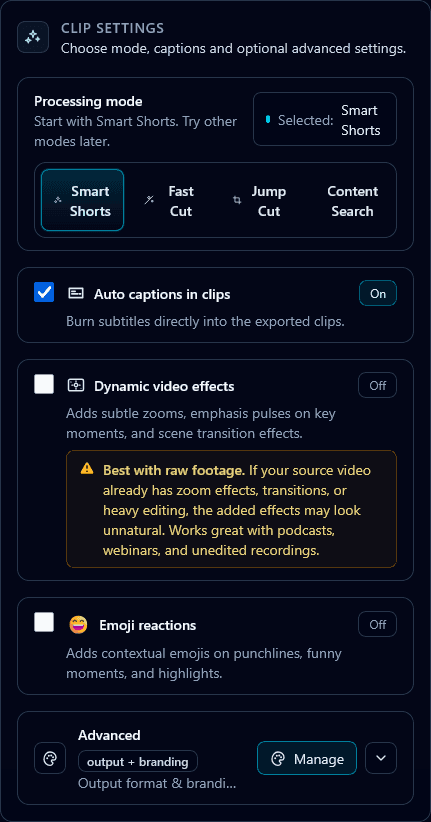
The AI Video Editing Revolution
Video editing has traditionally been one of the most time-consuming aspects of content creation. Scrubbing through hours of footage, cutting clips, syncing audio, adding captions – it's tedious work that requires both skill and patience.
AI is changing that equation dramatically. Tasks that once took hours can now be completed in minutes. And it's not just about speed – AI is enabling capabilities that weren't possible before, like automatically identifying the most engaging moments in a video or predicting which clips will perform best on social media.
Let's explore the specific ways AI is transforming video editing today — and how tools like Klypse let you turn videos into shorts with a single upload.
Key AI Video Editing Capabilities
Automatic Highlight Detection
AI can analyze your video to identify the most engaging moments – strong hooks, emotional peaks, quotable statements, and natural breakpoints. Instead of manually scrubbing through a 2-hour recording, AI surfaces the clips that matter most.
Smart Face Tracking & Cropping
Converting landscape video to vertical format used to mean manually keyframing crop positions. AI face tracking automatically follows speakers across the frame, keeping them centered in vertical video without any manual work.
Automatic Caption Generation
AI transcription has reached the point where it's highly accurate, fast, and affordable. What used to require expensive transcription services or hours of manual typing now happens automatically in minutes, with speaker identification and punctuation included.
Viral Potential Scoring
Some AI tools can predict how well a clip might perform on social platforms by analyzing hook strength, pacing, emotional content, and other factors. This helps creators prioritize which clips to focus on and optimize.
Automatic B-Roll & Asset Suggestions
AI can analyze your content and suggest relevant stock footage, images, or graphics to enhance your video. Some tools even automatically insert appropriate b-roll based on what's being discussed.
Silence & Filler Removal
AI can detect and remove awkward pauses, "ums," "ahs," and other filler words automatically. This creates tighter, more engaging content without manual scrubbing through every moment.
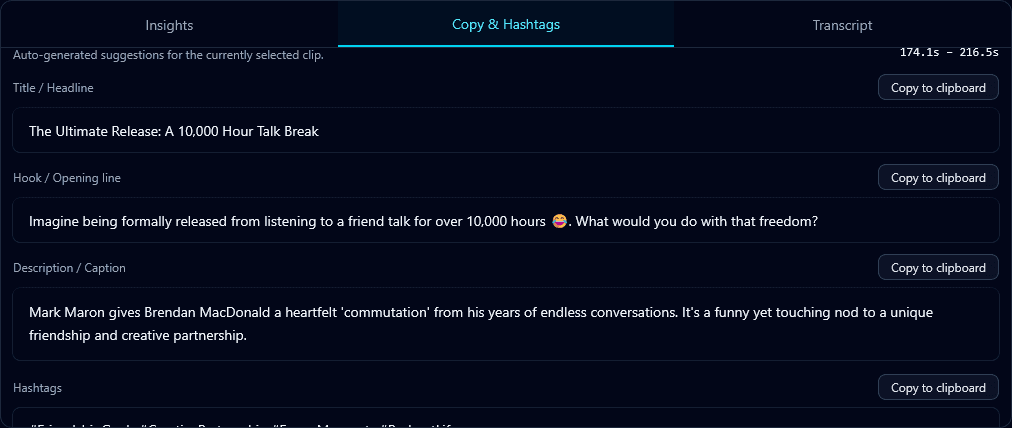
AI automatically generates captions, hooks, and social media copy
Benefits of AI Video Editing
Dramatic Time Savings
The most obvious benefit. Tasks that took hours now take minutes. This isn't a marginal improvement – it's often 90%+ reduction in editing time for specific tasks.
Consistency at Scale
AI doesn't get tired or make inconsistent decisions. Whether it's your first clip or your thousandth, the quality remains constant. This is crucial for brands maintaining visual standards across large content volumes.
Democratized Video Creation
You no longer need expensive software, years of training, or professional editors to create polished video content. AI tools are making professional-quality output accessible to everyone.
Data-Driven Decisions
AI can analyze patterns from millions of videos to inform editing decisions. This data-driven approach can lead to better performing content than pure intuition alone.
Focus on Creativity
By automating the tedious parts of editing, AI frees creators to focus on what matters: strategy, storytelling, and creative vision. The technology handles the grunt work.
What AI Still Can't Do (Yet)
AI video editing has limitations. It's important to understand what it excels at and where human judgment is still essential.
- •Creative storytelling: AI can find moments, but crafting a narrative arc that resonates emotionally still requires human creativity.
- •Brand voice nuance: Understanding subtle brand guidelines and tone is still challenging for AI. Human review is essential for brand content.
- •Context-dependent decisions: AI might not understand that a particular clip, while engaging, isn't appropriate for a specific audience or purpose.
- •Complex creative edits: Intricate motion graphics, custom animations, and highly stylized edits still require skilled human editors.
The sweet spot: Use AI for the time-consuming, repetitive tasks while reserving your creative energy for strategic decisions and final polish. This hybrid approach gets the best of both worlds.
Practical Applications Today
Content Creators
Turn long-form content into short clips for TikTok, Reels, and Shorts automatically. Scale content output without scaling work hours.
Podcasters
Extract video highlights from podcast recordings for social promotion. Auto-generate transcripts for show notes and SEO.
Marketing Teams
Repurpose webinar and event content into social assets. Maintain brand consistency across high content volumes.
Agencies
Scale video production services without proportionally scaling headcount. Deliver faster turnarounds to clients.
Educators
Create accessible content with auto-captions. Break down long lectures into digestible segments for better engagement.
Businesses
Transform meeting recordings into training content. Create internal communication videos without dedicated video teams.
The Future of AI Video Editing
We're still in the early stages of AI video editing. The technology is improving rapidly. Here's what's coming:
- More sophisticated understanding of narrative and storytelling
- Real-time editing during live streams
- Better integration of generated visual elements
- Improved understanding of brand voice and style
- Predictive analytics for content performance before publishing
- Seamless multi-language adaptation and localization
The creators and businesses who embrace these tools today will have a significant advantage as the technology matures. Learning to work effectively with AI now means you'll be ready for even more powerful capabilities tomorrow.
Getting Started with AI Video Editing
The barrier to entry is lower than ever. You don't need technical expertise or big budgets to start using AI video editing tools. Here's how to begin:
- Identify your biggest time sink. Where do you spend the most time in your current editing workflow? That's where AI can have the biggest impact.
- Start with one use case. Don't try to automate everything at once. Pick one task – like generating short clips from long content – and master it.
- Choose the right tool. Different tools excel at different things. For repurposing long-form video into short clips, Klypse is purpose-built for this workflow.
- Review and refine. AI output is rarely perfect on the first try. Build in time to review, adjust, and learn what works best for your content.
- Iterate and expand. Once you've got one workflow humming, look for the next opportunity to incorporate AI assistance.
Ready to see AI video editing in action? Klypse's AI video editor handles the full workflow — from turning long videos into shorts to adding captions and tracking faces automatically.
Related Reading
Experience AI Video Editing with Klypse
See how AI can transform your video workflow. Automatic highlight detection, face tracking, captions, and more — all in one tool.